Managing my dotfiles
If you check the last entry's date you can see that this has been a pretty busy semester at uni (and it still is, I should be studying right now...), so this will be a short one.
A few weeks back I was procrastinating working on some shitty app we have to make for one class, so instead of working I just installed arch linux on my main pc. I've been using arch on my laptop for a while now, but I still had windows on my desktop (ltsc tho). In theory I was going to wait until winter break for the change, but I just couldn't wait, so I just installed it.
As always I had to redo the instalation twice because I always mess up setting up grub, but the installation is very straightforward, you just follow the wiki instructions.
Using arch is great and it has some comfy tools (ily pacman), but setting up everything is kinda rough, especially when you have already spent time configuring many things to your liking once, so I wanted some good way to share my config files.
On the internet I had already seen some people hosting their own config files on GitHub, but I was a bit unsure on how to link files on a git repository to my .config directory. Looking around I found that there is already a tool made for this exact problem: "stow".
Stow is a tool that manages symlinks between directories. You can use it to link directories on your git repository to your .config directory. Setting everything up is easy, just search a guide on google.
I've created my dotfiles repo, with this structure:
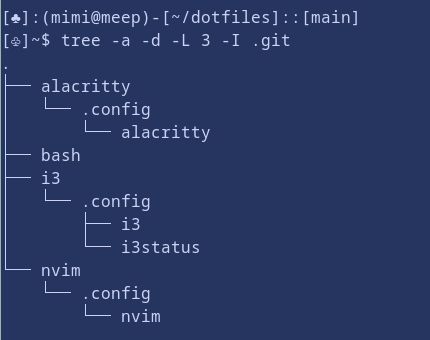
You can see that I can have my config files in there which is great. Now if I make any change on the repo, I can just pull from my other computer and have everything ready to go.
I don't think I'll use i3 on my desktop computer though (I'm using cinnamon for now), but is good to know that I can just switch and have everything configured just like my laptop. (There were some compatibility issues with some applets, but everything should be ok now...).
My main reason to make this was neovim. Setting up the package manager and the plugins was a pain, so I didn't want to start from scratch. Now I have everything exactly as I have it on my laptop (and some more, I finally installed an lsp).
Linking alacritty and my bashrc files wasn't as necessary, but now I can easily use sus instead of sudo on all my computers from now on, so it's a win.
As always, you can check the GitHub repo if you want to checkout my config files. Probably they won't be useful for anybody else though.
Thanks for reading :)